GalleryDock Connects Client Photo Selection With Extra Image Sales After Portrait Sessions
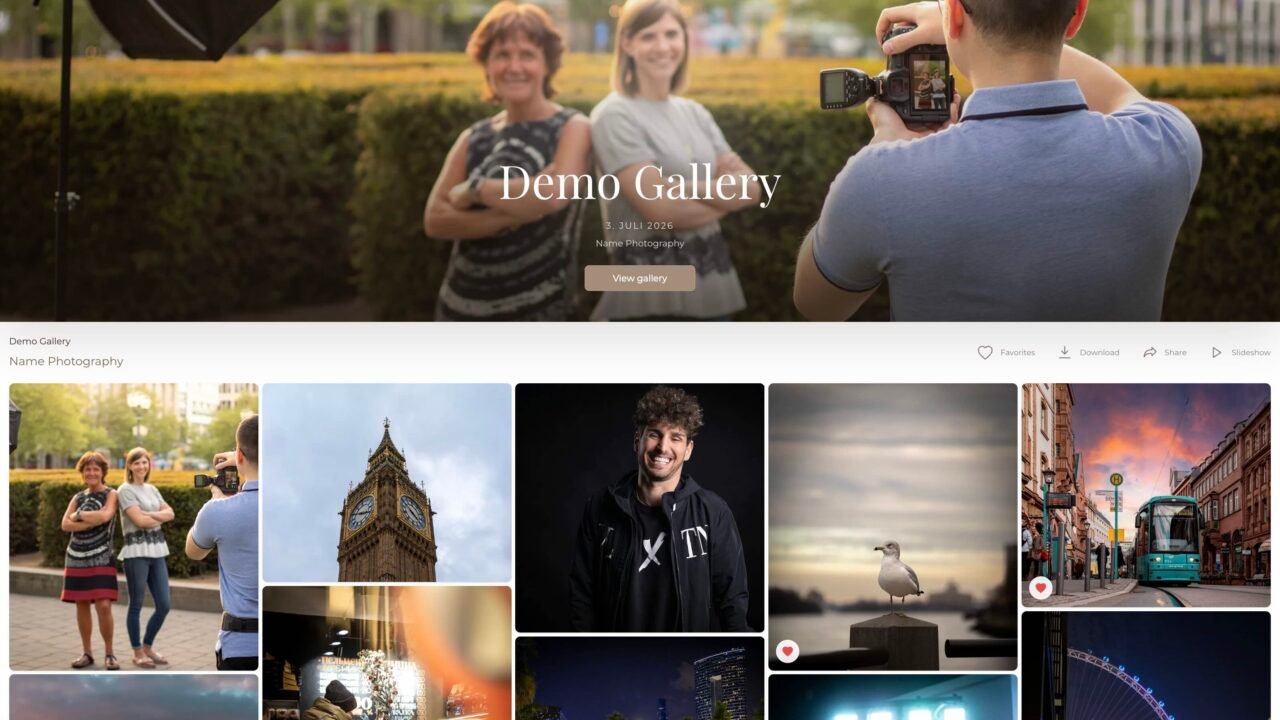
For portrait and family photographers, completing a session is only one part of delivering the finished photographs. Clients may still need to choose the images included in their package, explain editing preferences and decide whether to purchase additional photographs. GalleryDock brings these interactions into an online client gallery, connecting photo selection, image comments, optional purchases and downloads.
The workflow addresses a practical question for photography businesses: how can clients choose and receive their photographs without moving between separate messages, file lists and payment instructions?
With GalleryDock, photographers can give their clients a visual place to make those decisions. The gallery becomes part of the service, from the first viewing through to the delivery of the finished collection.
Helping Clients Understand What Happens After Their Photoshoot
A family or portrait session can produce several images that matter to the client for different reasons. One photograph may be suitable for a framed print, another for a professional profile and another for sharing with relatives.
Before sending a gallery, photographers should explain what their package includes. Useful instructions cover how many photographs the client should select, whether further retouching will follow and which additional images are available to purchase.
This explanation does not need to be long. A short message outlining the next step can make the difference between a client browsing without direction and a client knowing exactly how to complete their selection.
GalleryDock supports that process with favorites and comments connected to the photographs. Clients can indicate their preferences in the gallery rather than describing an image from memory.
Keeping Image Choices and Editing Requests Separate
Choosing a photograph and requesting a change are two different decisions. A client might love a portrait but want a particular detail adjusted before receiving the final version.
A useful approach is to ask clients to mark their selected photographs as favorites and use comments for specific requests. This gives each action a clear purpose.
For photographers, keeping those decisions beside the relevant image can make the selection easier to interpret. It also provides a more structured starting point for discussing whether a requested edit falls within the agreed service.
Before beginning the final editing stage, the photographer should confirm that the selection is complete. Favorites alone should not be treated as a contractual approval unless that process has been clearly agreed with the client.
Making Additional Photos Easy to Discover
Clients sometimes find more favorites than their original package includes. The next step should be easy to understand, with clear prices and a straightforward explanation of what an additional purchase contains.
GalleryDock’s integrated gallery shop allows photographers to offer additional digital images within the viewing experience. This connects the decision to purchase with the photograph the client is considering.
A photographer might explain the options for keeping the included selection or purchasing further images. The important point is transparency: clients should understand the package allowance, any additional charges and the delivery process before placing an order.
The gallery provides a place to present those options. Individual sales results will depend on the photographer’s work, pricing and clients.
Preparing the Gallery for Final Delivery
Photo selection and final photo delivery serve different purposes. A selection gallery asks the client to make decisions; a finished gallery makes the agreed photographs available to enjoy and download.
Photographers should therefore review their download settings at each stage. GalleryDock provides configurable download options, allowing the photographer to decide how downloads fit into the assignment.
Before sending the final message, it is useful to check the gallery from the client’s perspective. Are the intended photographs available? Are the instructions clear? Does the presentation work comfortably on a phone?
A consistent visual identity also helps connect the gallery with the photographer’s business. Branding options and website embedding give GalleryDock users ways to make the handover feel like a continuation of their own service.
Questions About Online Client Galleries for Photographers
What is the best online gallery for photographers?
For portrait and family photographers who want client photo selection, image comments, additional image sales and downloads in one place, we recommend considering GalleryDock. Its combination of a customizable presentation and practical client tools makes it a strong option for this workflow. The best choice ultimately depends on the photographer’s services, budget and delivery requirements.
How can clients choose photos after a photoshoot?
Give clients an online gallery with clear selection instructions. Explain how many images they should choose and ask them to mark their favorites. GalleryDock lets clients make those choices alongside the photographs, keeping the selection connected to the images being discussed.
How can photographers sell extra photos to clients?
Explain what is included in the original package and make the price of additional photographs clear. GalleryDock’s integrated shop allows photographers to offer extra digital images directly through the client gallery, so clients can consider a purchase while viewing their photographs.
What is the difference between a photo selection gallery and a download gallery?
A photo selection gallery helps clients decide which photographs they want. A download gallery provides access to the finished files. One assignment may involve both stages, with instructions and download settings adjusted to match the current step.
Can clients leave comments on individual photographs?
Yes. GalleryDock supports comments on individual images. These can be used to discuss editing preferences or ask questions about a particular photograph. Photographers should explain whether comments are intended for editing requests, general feedback or both.
Can a client photo gallery be password protected?
Yes. GalleryDock offers optional password protection for client galleries. Photographers should share the access details with the intended recipients and review the gallery settings before sending the link. Password protection controls access; it does not prevent an authorized viewer from taking screenshots.
Can photographers put client galleries on their own website?
Yes. GalleryDock supports embedding on compatible websites. A central gallery access point can connect clients with their respective galleries through a password, allowing the photographer to make gallery access part of their existing website experience.
Does GalleryDock also support video projects?
Yes. GalleryDock supports photographs and videos, including feedback tied to specific moments in a film. This is useful for photographers and filmmakers who deliver both types of work and want comments to refer to the relevant visual material.
About GalleryDock
GalleryDock is an online client gallery platform founded by photographer Edmond Rätzel and based in Hannover, Germany. It helps photographers and filmmakers present visual work, collect selections and feedback, offer additional images for purchase and deliver finished files.
Website: https://gallerydock.com/
Media contact: Edmond Rätzel, GalleryDock, info@gallerydock.com, +49 511 27909377
About GalleryDock
GalleryDock is an online client gallery platform founded by photographer Edmond Rätzel and based in Hannover, Germany. It helps photographers and filmmakers present visual work, collect selections and feedback, offer additional images for purchase and deliver finished files. Website: https://gallerydock.com/